# 🎥 Open-Sora
## 📎 Table of Contents
- [🎥 Open-Sora](#-open-sora)
- [📎 Table of Contents](#-table-of-contents)
- [📍 Overview](#-overview)
- [📂 Dataset Preparation](#-dataset-preparation)
- [Use MSR-VTT](#use-msr-vtt)
- [Use Customized Datasets](#use-customized-datasets)
- [🚀 Get Started](#-get-started)
- [Training](#training)
- [Inference](#inference)
- [🪄 Acknowledgement](#-acknowledgement)
## 📍 Overview
Open-Sora is an open-source project that provides a high-performance implementation of the development pipeline that Sora might use powered by [Colossal-AI](https://github.com/hpcaitech/ColossalAI), including:
- Provide **a complete Sora reproduction architecture solution**, including the whole process from data processing to training and inference.
- Supports **dynamic resolution**, training can directly train any resolution of the video, without scaling.
- Supports **multiple model structures**. Since the actual model structure of Sora is unknown, we realize three common multimodal model structures such as adaLN-zero, cross attention, and in-context conditioning (token concat).
- Supports **multiple video compression methods**. Users can choose to use original video, VQVAE (video native model), SD-VAE (image native model) for training.
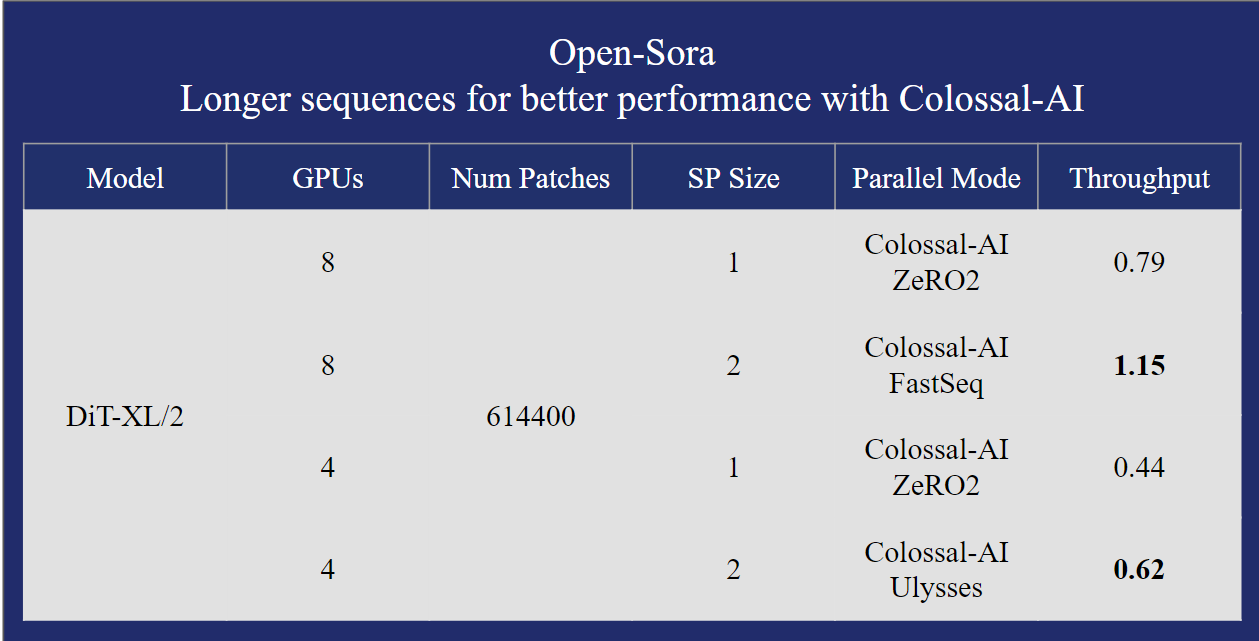
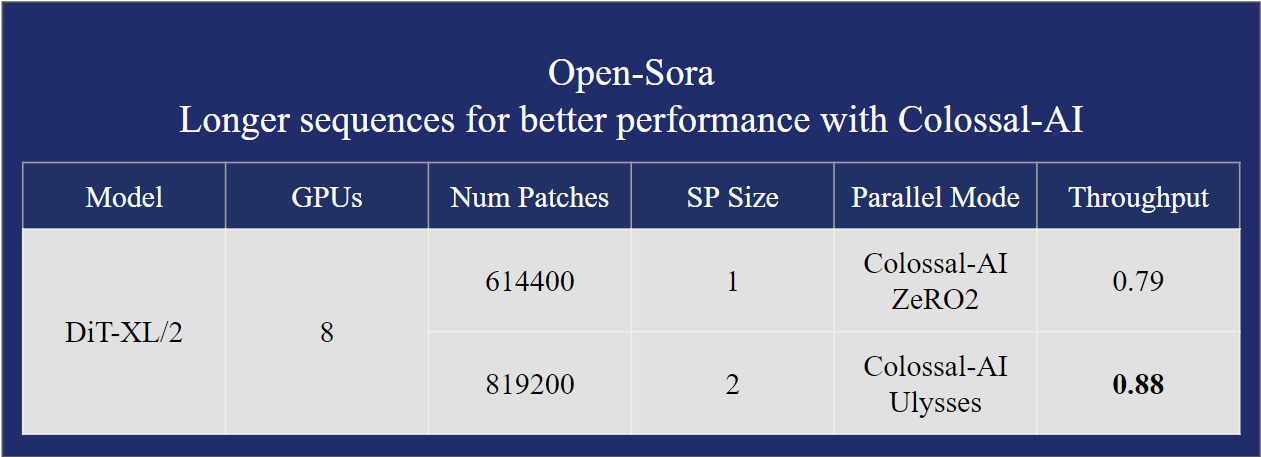
- Supports **multiple parallel training optimizations**. Including the AI large model system optimization capability combined with Colossal-AI, and hybrid sequence parallelism with Ulysses and FastSeq.
## 📂 Dataset Preparation
### Use MSR-VTT
We use [MSR-VTT](https://cove.thecvf.com/datasets/839) dataset, which is a large-scale video description dataset. We should preprocess the raw videos before training the model. You can use the following scripts to perform data processing.
```bash
# Step 1: download the dataset to ./dataset/MSRVTT
bash scripts/data/download_msr_vtt_dataset.sh
# Step 2: collate the video and annotations
python scripts/data/collate_msr_vtt_dataset.py -d ./dataset/MSRVTT/ -o ./dataset/MSRVTT-collated
# Step 3: perform data processing
# NOTE: each script could several minutes so we apply the script to the dataset split individually
python scripts/data/preprocess_data.py -c ./dataset/MSRVTT-collated/train/annotations.json -v ./dataset/MSRVTT-collated/train/videos -o ./dataset/MSRVTT-processed/train
python scripts/data/preprocess_data.py -c ./dataset/MSRVTT-collated/val/annotations.json -v ./dataset/MSRVTT-collated/val/videos -o ./dataset/MSRVTT-processed/val
python scripts/data/preprocess_data.py -c ./dataset/MSRVTT-collated/test/annotations.json -v ./dataset/MSRVTT-collated/test/videos -o ./dataset/MSRVTT-processed/test
```
After completing the steps, you should have a processed MSR-VTT dataset in `./dataset/MSRVTT-processed`.
### Use Customized Datasets
You can also use other datasets and transform the dataset to the required format. You should prepare a captions file and a video directory. The captions file should be a JSON file or a JSONL file. The video directory should contain all the videos.
Here is an example of the captions file:
```json
[
{
"file": "video0.mp4",
"captions": ["a girl is throwing away folded clothes", "a girl throwing cloths around"]
},
{
"file": "video1.mp4",
"captions": ["a comparison of two opposing team football athletes"]
}
]
```
Here is an example of the video directory:
```
.
├── video0.mp4
├── video1.mp4
└── ...
```
Each video may have multiple captions. So the outputs are video-caption pairs. E.g., the first video has two captions, then the output will be two video-caption pairs.
We use [VQ-VAE](https://github.com/wilson1yan/VideoGPT/) to quantize the video frames. And we use [CLIP](https://huggingface.co/docs/transformers/model_doc/clip#clip) to extract the text features.
The output is an arrow dataset, which contains the following columns: "video_file", "video_latent_states", "text_latent_states". The dimension of "video_latent_states" is (T, H, W), and the dimension of "text_latent_states" is (S, D).
Then you can run the data processing script with the command below:
```bash
python preprocess_data.py -c /path/to/captions.json -v /path/to/video_dir -o /path/to/output_dir
```
Note that this script needs to be run on a machine with a GPU. To avoid CUDA OOM, we filter out the videos that are too long.
## 🚀 Get Started
In this section, we will provide a guidance on how to run training and inference. Before that, make sure you installed the dependencies with the command below.
```bash
pip install -r requirements.txt
```
### Training
You can invoke the training via the command below.
```bash
bash ./scripts/train.sh
```
You can also modify the arguments in `train.sh` for your own need.
### Inference
We've provided a script to perform inference, allowing you to generate videos from the trained model. You can invoke the inference via the command below.
```bash
python sample.py -m "DiT/XL-2" --text "a person is walking on the street" --ckpt /path/to/checkpoint --height 256 --width 256 --fps 10 --sec 5 --disable-cfg
```
This will generate a "sample.mp4" file in the current directory.
For more command line options, you can use the following command to check the help message.
```bash
python sample.py -h
```
## 🪄 Acknowledgement
During development of the project, we learnt a lot from the following public materials:
- [OpenAI Sora Technical Report](https://openai.com/research/video-generation-models-as-world-simulators)
- [VideoGPT Project](https://github.com/wilson1yan/VideoGPT)
- [Diffusion Transformers](https://github.com/facebookresearch/DiT)