2024-06-16 03:20:56 +02:00
< p align = "center" >
2024-06-18 09:01:12 +02:00
< img src = "../../assets/readme/icon.png" width = "250" / >
2024-06-16 03:20:56 +02:00
< / p >
< div align = "center" >
< a href = "https://github.com/hpcaitech/Open-Sora/stargazers" > < img src = "https://img.shields.io/github/stars/hpcaitech/Open-Sora?style=social" > < / a >
< a href = "https://hpcaitech.github.io/Open-Sora/" > < img src = "https://img.shields.io/badge/Gallery-View-orange?logo=&" > < / a >
< a href = "https://discord.gg/kZakZzrSUT" > < img src = "https://img.shields.io/badge/Discord-join-blueviolet?logo=discord&" > < / a >
< a href = "https://join.slack.com/t/colossalaiworkspace/shared_invite/zt-247ipg9fk-KRRYmUl~u2ll2637WRURVA" > < img src = "https://img.shields.io/badge/Slack-ColossalAI-blueviolet?logo=slack&" > < / a >
< a href = "https://twitter.com/yangyou1991/status/1769411544083996787?s=61&t=jT0Dsx2d-MS5vS9rNM5e5g" > < img src = "https://img.shields.io/badge/Twitter-Discuss-blue?logo=twitter&" > < / a >
< a href = "https://raw.githubusercontent.com/hpcaitech/public_assets/main/colossalai/img/WeChat.png" > < img src = "https://img.shields.io/badge/微信-小助手加群-green?logo=wechat&" > < / a >
< a href = "https://hpc-ai.com/blog/open-sora-v1.0" > < img src = "https://img.shields.io/badge/Open_Sora-Blog-blue" > < / a >
< a href = "https://huggingface.co/spaces/hpcai-tech/open-sora" > < img src = "https://img.shields.io/badge/%F0%9F%A4%97%20Hugging%20Face-Gradio Demo-blue" > < / a >
< / div >
2024-06-16 04:27:13 +02:00
## Open-Sora: 让所有人都能轻松制作高效视频
2024-06-16 03:20:56 +02:00
2024-06-16 04:27:13 +02:00
我们设计并实施了**Open-Sora**, , ,
2024-06-16 03:20:56 +02:00
2024-07-08 08:31:42 +02:00
[[中文文档 ](/docs/zh_CN/README.md )] [[潞晨云 ](https://cloud.luchentech.com/ )|[OpenSora镜像](https://cloud.luchentech.com/doc/docs/image/open-sora/)|[视频教程](https://www.bilibili.com/video/BV1ow4m1e7PX/?vd_source=c6b752764cd36ff0e535a768e35d98d2)]
2024-06-16 03:20:56 +02:00
2024-06-16 04:27:13 +02:00
## 📰 资讯
2024-06-16 03:20:56 +02:00
2024-12-23 15:00:11 +01:00
* **[2024.12.23]** 🔥[视频生成模型开发成本直降50%, ,
2024-06-26 15:48:58 +02:00
* **[2024.06.22]** 🔥我们在[潞晨云](https://cloud.luchentech.com/)上发布了Open-Sora1.2镜像,
* **[2024.06.17]** 🔥我们发布了**Open-Sora 1.2**,其中包括**3D-VAE**,
2024-06-16 04:27:13 +02:00
* **[2024.04.25]** 🤗 我们在 Hugging Face Spaces 上发布了 [Open-Sora的Gradio演示 ](https://huggingface.co/spaces/hpcai-tech/open-sora )。
2024-06-26 15:48:58 +02:00
* **[2024.04.25]** 我们发布了**Open-Sora 1.1**,支持**2s~15s、144p 到 720p、任意比例的文本转图片、文本转视频、图片转视频、视频转视频、无限时间生成**。此外,还发布了完整的视频处理管道。 [[模型权重]](#模型权重) [[技术报告]](report_v2.md)[[公众号文章]](https://mp.weixin.qq.com/s/nkPSTep2se__tzp5OfiRQQ)
2024-06-16 04:27:13 +02:00
* **[2024.03.18]** 我们发布了 **Open-Sora 1.0** , 一个完全开源的视频生成项目。Open-Sora 1.0 支持完整的视频数据预处理流程、加速训练
2024-06-26 15:48:58 +02:00
< a href = "https://github.com/hpcaitech/ColossalAI" > < img src = "/assets/readme/colossal_ai.png" width = "8%" > < / a >
、推理等。我们的模型只需 3 天的训练就可以生成 2 秒的 512x512 视频。 [[模型权重]](#模型权重)
[[公众号文章]](https://mp.weixin.qq.com/s/H52GW8i4z1Dco3Sg--tCGw) [[技术报告]](report_v1.md)
2024-06-16 04:27:13 +02:00
* **[2024.03.04]** Open-Sora 提供培训,成本降低 46%。
2024-06-26 15:48:58 +02:00
[[公众号文章]](https://mp.weixin.qq.com/s/OjRUdrM55SufDHjwCCAvXg)
2024-06-16 03:20:56 +02:00
## 🎥 Latest Demo
2024-06-16 04:27:13 +02:00
🔥 您可以在HuggingFace上的 [🤗 Gradio应用程序 ](https://huggingface.co/spaces/hpcai-tech/open-sora )上体验Open-Sora. 我们的[画廊](https://hpcaitech.github.io/Open-Sora/)中提供了更多示例.
2024-06-16 03:20:56 +02:00
2024-06-26 15:48:58 +02:00
| **4s 720× | **4s 720× | **4s 720× |
| ---------------------------------------------------------------------------------------------------------------------------------------------------- | ---------------------------------------------------------------------------------------------------------------------------------------------------- | ---------------------------------------------------------------------------------------------------------------------------------------------------- |
| [<img src="/assets/demo/v1.2/sample_0013.gif" width=""> ](https://github.com/hpcaitech/Open-Sora/assets/99191637/7895aab6-ed23-488c-8486-091480c26327 ) | [<img src="/assets/demo/v1.2/sample_1718.gif" width=""> ](https://github.com/hpcaitech/Open-Sora/assets/99191637/20f07c7b-182b-4562-bbee-f1df74c86c9a ) | [<img src="/assets/demo/v1.2/sample_0087.gif" width=""> ](https://github.com/hpcaitech/Open-Sora/assets/99191637/3d897e0d-dc21-453a-b911-b3bda838acc2 ) |
| [<img src="/assets/demo/v1.2/sample_0052.gif" width=""> ](https://github.com/hpcaitech/Open-Sora/assets/99191637/644bf938-96ce-44aa-b797-b3c0b513d64c ) | [<img src="/assets/demo/v1.2/sample_1719.gif" width=""> ](https://github.com/hpcaitech/Open-Sora/assets/99191637/272d88ac-4b4a-484d-a665-8d07431671d0 ) | [<img src="/assets/demo/v1.2/sample_0002.gif" width=""> ](https://github.com/hpcaitech/Open-Sora/assets/99191637/ebbac621-c34e-4bb4-9543-1c34f8989764 ) |
| [<img src="/assets/demo/v1.2/sample_0011.gif" width=""> ](https://github.com/hpcaitech/Open-Sora/assets/99191637/a1e3a1a3-4abd-45f5-8df2-6cced69da4ca ) | [<img src="/assets/demo/v1.2/sample_0004.gif" width=""> ](https://github.com/hpcaitech/Open-Sora/assets/99191637/d6ce9c13-28e1-4dff-9644-cc01f5f11926 ) | [<img src="/assets/demo/v1.2/sample_0061.gif" width=""> ](https://github.com/hpcaitech/Open-Sora/assets/99191637/561978f8-f1b0-4f4d-ae7b-45bec9001b4a ) |
2024-06-16 03:20:56 +02:00
< details >
2024-06-16 04:27:13 +02:00
< summary > OpenSora 1.1 演示< / summary >
2024-06-16 03:20:56 +02:00
2024-06-16 04:27:13 +02:00
| **2秒 240× | **2秒 240× |
2024-06-16 03:20:56 +02:00
| ----------------------------------------------------------------------------------------------------------------------------------------------------------- | ---------------------------------------------------------------------------------------------------------------------------------------------------------- |
2024-06-16 05:27:24 +02:00
| [<img src="/assets/demo/sample_16x240x426_9.gif" width=""> ](https://github.com/hpcaitech/Open-Sora-dev/assets/99191637/c31ebc52-de39-4a4e-9b1e-9211d45e05b2 ) | [<img src="/assets/demo/sora_16x240x426_26.gif" width=""> ](https://github.com/hpcaitech/Open-Sora-dev/assets/99191637/c31ebc52-de39-4a4e-9b1e-9211d45e05b2 ) |
| [<img src="/assets/demo/sora_16x240x426_27.gif" width=""> ](https://github.com/hpcaitech/Open-Sora-dev/assets/99191637/f7ce4aaa-528f-40a8-be7a-72e61eaacbbd ) | [<img src="/assets/demo/sora_16x240x426_40.gif" width=""> ](https://github.com/hpcaitech/Open-Sora-dev/assets/99191637/5d58d71e-1fda-4d90-9ad3-5f2f7b75c6a9 ) |
2024-06-16 03:20:56 +02:00
2024-06-16 04:27:13 +02:00
| **2秒 426× | **4秒 480× |
2024-06-16 03:20:56 +02:00
| ---------------------------------------------------------------------------------------------------------------------------------------------------------- | ----------------------------------------------------------------------------------------------------------------------------------------------------------- |
2024-06-16 05:27:24 +02:00
| [<img src="/assets/demo/sora_16x426x240_24.gif" width=""> ](https://github.com/hpcaitech/Open-Sora-dev/assets/99191637/34ecb4a0-4eef-4286-ad4c-8e3a87e5a9fd ) | [<img src="/assets/demo/sample_32x480x854_9.gif" width=""> ](https://github.com/hpcaitech/Open-Sora-dev/assets/99191637/c1619333-25d7-42ba-a91c-18dbc1870b18 ) |
2024-06-16 03:20:56 +02:00
2024-06-16 04:27:13 +02:00
| **16秒 320× | **16秒 224× | **2秒 426× |
2024-06-16 03:20:56 +02:00
| ------------------------------------------------------------------------------------------------------------------------------------------------------ | ------------------------------------------------------------------------------------------------------------------------------------------------------ | --------------------------------------------------------------------------------------------------------------------------------------------------------- |
2024-06-16 05:27:24 +02:00
| [<img src="/assets/demo/sample_16s_320x320.gif" width=""> ](https://github.com/hpcaitech/Open-Sora/assets/99191637/3cab536e-9b43-4b33-8da8-a0f9cf842ff2 ) | [<img src="/assets/demo/sample_16s_224x448.gif" width=""> ](https://github.com/hpcaitech/Open-Sora/assets/99191637/9fb0b9e0-c6f4-4935-b29e-4cac10b373c4 ) | [<img src="/assets/demo/sora_16x426x240_3.gif" width=""> ](https://github.com/hpcaitech/Open-Sora-dev/assets/99191637/3e892ad2-9543-4049-b005-643a4c1bf3bf ) |
2024-06-16 03:20:56 +02:00
2024-06-16 04:27:13 +02:00
2024-06-16 03:20:56 +02:00
< / details >
< details >
< summary > OpenSora 1.0 Demo< / summary >
2024-06-16 04:27:13 +02:00
| **2秒 512× | **2秒 512× | **2秒 512× |
2024-06-16 03:20:56 +02:00
| ------------------------------------------------------------------------------------------------------------------------------------------------------------------------------ | --------------------------------------------------------------------------------------------------------------------------------------------------------------------------- | ------------------------------------------------------------------------------------------------------------------------------------------------- |
2024-06-16 05:27:24 +02:00
| [<img src="/assets/readme/sample_0.gif" width=""> ](https://github.com/hpcaitech/Open-Sora/assets/99191637/de1963d3-b43b-4e68-a670-bb821ebb6f80 ) | [<img src="/assets/readme/sample_1.gif" width=""> ](https://github.com/hpcaitech/Open-Sora/assets/99191637/13f8338f-3d42-4b71-8142-d234fbd746cc ) | [<img src="/assets/readme/sample_2.gif" width=""> ](https://github.com/hpcaitech/Open-Sora/assets/99191637/fa6a65a6-e32a-4d64-9a9e-eabb0ebb8c16 ) |
2024-06-16 04:27:13 +02:00
|森林地区宁静的夜景。 [...] 该视频是一段延时摄影,捕捉了白天到夜晚的转变,湖泊和森林始终作为背景。 | 无人机拍摄的镜头捕捉到了海岸悬崖的壮丽美景,[...] 海水轻轻地拍打着岩石底部和紧贴悬崖顶部的绿色植物。| 瀑布从悬崖上倾泻而下,流入宁静的湖泊,气势磅礴。[...] 摄像机角度提供了瀑布的鸟瞰图。 |
2024-06-16 05:27:24 +02:00
| [<img src="/assets/readme/sample_3.gif" width=""> ](https://github.com/hpcaitech/Open-Sora/assets/99191637/64232f84-1b36-4750-a6c0-3e610fa9aa94 ) | [<img src="/assets/readme/sample_4.gif" width=""> ](https://github.com/hpcaitech/Open-Sora/assets/99191637/983a1965-a374-41a7-a76b-c07941a6c1e9 ) | [<img src="/assets/readme/sample_5.gif" width=""> ](https://github.com/hpcaitech/Open-Sora/assets/99191637/ec10c879-9767-4c31-865f-2e8d6cf11e65 ) |
2024-06-16 04:27:13 +02:00
| 夜晚繁华的城市街道,充满了汽车前灯的光芒和路灯的氛围光。 [...] | 向日葵田的生机勃勃,美不胜收。向日葵整齐排列,给人一种秩序感和对称感。 [...] |宁静的水下场景,一只海龟在珊瑚礁中游动。这只海龟的壳呈绿褐色 [...] |
2024-06-16 03:20:56 +02:00
2024-06-16 04:27:13 +02:00
视频经过降采样以.gif用于显示。单击查看原始视频。提示经过修剪以用于显示,
2024-06-16 03:20:56 +02:00
< / details >
2024-06-16 04:27:13 +02:00
## 🔆 新功能/更新
2024-06-17 17:37:23 +02:00
* 📍 **Open-Sora 1.2** 发布。模型权重可在[此处](#model-weights)查看。有关更多详细信息,请参阅我们的**[技术报告 v1.2](docs/report_03.md)** 。
2024-06-16 04:27:13 +02:00
* ✅ 支持整流流调度。
* ✅ 训练我们的 3D-VAE 进行时间维度压缩。
* 📍 **Open-Sora 1.1**发布。模型权重可在[此处](#model-weights)获得。它针对**0s~15s、144p 到 720p、各种宽高比**的视频进行训练。有关更多讨论,请参阅我们的** [技术报告 v1.1 ](/docs/report_02.md )** 。
* 🔧 **数据处理流程** v1.1发布,提供从原始视频到(文本,视频片段)对的自动处理流程,包括场景剪切$\rightarrow$过滤(
* ✅ 改进的 ST-DiT 架构包括 rope 位置编码、qk 范数、更长的文本长度等。
* ✅ 支持任意分辨率、纵横比和时长(包括图像)的训练。
* ✅ 支持图像和视频调节以及视频编辑,从而支持动画图像,连接视频等。
* 📍 **Open-Sora 1.0**发布。模型权重可在[此处](#model-weights)获得。仅使用 400K 视频片段和 200 个 H800 天(相比稳定视频扩散中的 152M 样本),我们就能生成 2s 512× [技术报告 v1.0 ](docs/report_01.md )**。
* ✅从图像扩散模型到视频扩散模型的三阶段训练。我们为每个阶段提供权重。
* ✅ 支持训练加速,包括加速 Transformer、更快的 T5 和 VAE 以及序列并行。Open-Sora 在 64x512x512 视频上训练时可将训练速度提高**55%**。详细信息位于[训练加速.md](docs/acceleration.md)。
* 🔧 **数据预处理流程 v1.0** ,包括 [下载 ](tools/datasets/README.md ), [视频剪辑 ](tools/scene_cut/README.md ), 和 [字幕 ](tools/caption/README.md ) 工具. 我们的数据收集计划可在 [数据集.md ](docs/datasets.md )中找到.
2024-06-16 03:20:56 +02:00
< details >
2024-06-16 04:27:13 +02:00
< summary > 查看更多< / summary >
✅ 我们发现[VideoGPT](https://wilson1yan.github.io/videogpt/index.html)的 VQ-VAE质量较低,
✅ 我们研究了不同的架构,包括 DiT、Latte 和我们提出的 **STDiT** 。我们的STDiT在质量和速度之间实现了更好的平衡。请参阅我们的 ** [技术报告v1.0 ](docs/report_01.md )**以了解更多讨论。
✅ 支持剪辑和T5文本调节。
✅ 通过将图像视为单帧视频,我们的项目支持在图像和视频上训练 DiT( ) ,
✅ 支持使用[DiT](https://github.com/facebookresearch/DiT), [Latte ](https://github.com/Vchitect/Latte ),
和 [PixArt ](https://pixart-alpha.github.io/ ).的官方权重进行推理。
✅ 重构代码库。查看[structure.md](docs/structure.md)以了解项目结构以及如何使用配置文件。
2024-06-16 03:20:56 +02:00
< / details >
2024-06-16 04:27:13 +02:00
### 按优先级排序的 TODO 列表
2024-06-16 03:20:56 +02:00
< details >
2024-06-16 04:27:13 +02:00
< summary > 查看更多< / summary >
2024-06-16 03:20:56 +02:00
2024-06-16 04:27:13 +02:00
* [x] 训练视频 VAE 并使我们的模型适应新的 VAE
* [x] 缩放模型参数和数据集大小
* [x] 纳入更好的调度程序(整流流程)
* [x] 评估流程
* [x] 完成数据处理流程(包括密集光流、美学评分、文本-图像相似度等)。有关更多信息,请参阅[数据集](/docs/datasets.md)
* [x] 支持图像和视频调节
* [x] 支持可变的纵横比、分辨率和持续时间
2024-06-16 03:20:56 +02:00
< / details >
2024-06-16 04:27:13 +02:00
## 内容
2024-06-16 03:20:56 +02:00
2024-06-16 04:27:13 +02:00
* [安装 ](#安装 )
* [模型权重 ](#模型权重 )
* [Gradio演示 ](#gradio演示 )
* [推理 ](#推理 )
* [数据处理 ](#数据处理 )
* [训练 ](#训练 )
* [评估 ](#评估 )
* [贡献 ](#贡献 )
* [引用 ](#引用 )
* [致谢 ](#致谢 )
2024-06-16 03:20:56 +02:00
2024-06-16 04:27:13 +02:00
下面列出了其他有用的文档和链接。
2024-06-16 03:20:56 +02:00
2024-06-16 05:27:24 +02:00
* 报告: [技术报告 v1.2 ](docs/report_v3.md ), [技术报告 v1.1 ](/docs/report_v2.md ), [技术报告 v1.0 ](/docs/report_v1.md ), [训练加速.md ](docs/acceleration.md )
2024-06-16 04:27:13 +02:00
* Repo 结构: [结构.md ](docs/structure.md )
* 配置文件说明: [config.md ](docs/config.md )
2024-06-16 03:20:56 +02:00
* Useful commands: [commands.md ](docs/commands.md )
2024-06-16 04:27:13 +02:00
* 数据处理管道和数据集: [datasets.md ](docs/datasets.md )
* 每个数据处理工具的 README: [dataset conventions and management ](/tools/datasets/README.md ), [scene cutting ](/tools/scene_cut/README.md ), [scoring ](/tools/scoring/README.md ), [caption ](/tools/caption/README.md )
2024-06-16 05:27:24 +02:00
* 评估: [eval ](/eval/README.md )
* 画廊: [gallery ](https://hpcaitech.github.io/Open-Sora/ )
2024-06-16 03:20:56 +02:00
2024-06-16 04:27:13 +02:00
## 安装
2024-06-16 03:20:56 +02:00
2024-06-16 04:27:13 +02:00
### 从源头安装
2024-06-16 03:20:56 +02:00
2024-06-16 05:27:24 +02:00
对于 CUDA 12.1,您可以使用以下命令[安装](/docs/installation.md)依赖项。否则,请参阅安装以获取有关不同 cuda 版本的更多说明以及数据预处理的其他依赖项。
2024-06-16 03:20:56 +02:00
```bash
# create a virtual env and activate (conda as an example)
conda create -n opensora python=3.9
conda activate opensora
# install torch, torchvision and xformers
pip install -r requirements/requirements-cu121.txt
# download the repo
git clone https://github.com/hpcaitech/Open-Sora
cd Open-Sora
# the default installation is for inference only
pip install -v . # for development mode, `pip install -v -e .`
(Optional, recommended for fast speed, especially for training) To enable `layernorm_kernel` and `flash_attn` , you need to install `apex` and `flash-attn` with the following commands.
```bash
# install flash attention
# set enable_flash_attn=False in config to disable flash attention
pip install packaging ninja
pip install flash-attn --no-build-isolation
# install apex
# set enable_layernorm_kernel=False in config to disable apex
pip install -v --disable-pip-version-check --no-cache-dir --no-build-isolation --config-settings "--build-option=--cpp_ext" --config-settings "--build-option=--cuda_ext" git+https://github.com/NVIDIA/apex.git
```
2024-06-16 05:27:24 +02:00
### 使用Docker
2024-06-16 03:20:56 +02:00
2024-06-16 05:27:24 +02:00
运行以下命令从提供的Dockerfile 构建docker 镜像。
2024-06-16 03:20:56 +02:00
```bash
2024-06-19 12:01:20 +02:00
docker build -t opensora .
2024-06-16 03:20:56 +02:00
```
2024-06-16 05:27:24 +02:00
运行以下命令以交互模式启动docker容器。
2024-06-16 03:20:56 +02:00
```bash
2024-06-19 12:01:20 +02:00
docker run -ti --gpus all -v .:/workspace/Open-Sora opensora
2024-06-16 03:20:56 +02:00
```
2024-06-16 05:27:24 +02:00
## 模型权重
2024-06-16 03:20:56 +02:00
2024-06-16 05:27:24 +02:00
### Open-Sora 1.2 模型权重
| 分辨率 | 模型大小 | 数据 | 迭代次数 | 批次大小 | 网址 |
2024-06-16 03:20:56 +02:00
| ---------- | ---------- | ---- | ----------- | ---------- | --- |
2024-06-26 15:48:58 +02:00
| Diffusion | 1.1B | 30M | 70k | 动态大小 | [:link: ](https://huggingface.co/hpcai-tech/OpenSora-STDiT-v3 ) |
| VAE | 384M | 3M | 1M | 8 | [:link: ](https://huggingface.co/hpcai-tech/OpenSora-VAE-v1.2 ) |
2024-06-16 03:20:56 +02:00
2024-06-16 05:45:50 +02:00
请参阅我们的**[report 1.2](docs/report_v3.md)**以了解更多信息。
2024-06-16 03:20:56 +02:00
2024-06-16 05:27:24 +02:00
### Open-Sora 1.1 模型权重
2024-06-16 03:20:56 +02:00
< details >
2024-06-16 05:27:24 +02:00
< summary > 查看更多< / summary >
2024-06-16 03:20:56 +02:00
2024-06-16 05:27:24 +02:00
| 分辨率 | M | Data | #iterations | Batch Size | URL |
2024-06-16 03:20:56 +02:00
| ------------------ | ---------- | -------------------------- | ----------- | ------------------------------------------------- | -------------------------------------------------------------------- |
| mainly 144p & 240p | 700M | 10M videos + 2M images | 100k | [dynamic ](/configs/opensora-v1-1/train/stage2.py ) | [:link: ](https://huggingface.co/hpcai-tech/OpenSora-STDiT-v2-stage2 ) |
| 144p to 720p | 700M | 500K HQ videos + 1M images | 4k | [dynamic ](/configs/opensora-v1-1/train/stage3.py ) | [:link: ](https://huggingface.co/hpcai-tech/OpenSora-STDiT-v2-stage3 ) |
2024-06-16 05:27:24 +02:00
请参阅我们的 ** [报告 1.1 ](docs/report_02.md )** 以了解更多信息。
2024-06-16 03:20:56 +02:00
2024-06-16 05:27:24 +02:00
:warning: **局限性** : 此版本包含已知问题,我们将在下一版本中修复这些问题(因为我们为下一版本节省了计算资源)。此外,由于此问题,视频生成可能会长时间失败,高分辨率将产生嘈杂的结果。
2024-06-16 03:20:56 +02:00
< / details >
2024-06-16 05:27:24 +02:00
### Open-Sora 1.0 模型权重
2024-06-16 03:20:56 +02:00
< details >
2024-06-16 05:27:24 +02:00
< summary > 查看更多< / summary >
2024-06-16 03:20:56 +02:00
2024-06-17 17:37:23 +02:00
| 分辨率 | 模型大小 | 数据 | 迭代次数 | 批量大小 | GPU 天数 (H800) | 网址
2024-06-16 03:20:56 +02:00
| ---------- | ---------- | ------ | ----------- | ---------- | --------------- |
| 16× × × :link: ](https://huggingface.co/hpcai-tech/Open-Sora/blob/main/OpenSora-v1-HQ-16x512x512.pth ) |
| 16× × × :link: ](https://huggingface.co/hpcai-tech/Open-Sora/blob/main/OpenSora-v1-HQ-16x256x256.pth ) |
| 16× × × :link: ](https://huggingface.co/hpcai-tech/Open-Sora/blob/main/OpenSora-v1-16x256x256.pth ) |
2024-06-16 05:27:24 +02:00
训练流程: 16x256x256 $\rightarrow$ 16x256x256 高清 $\rightarrow$ 16x512x512 高质量.
2024-06-16 03:20:56 +02:00
2024-06-16 05:27:24 +02:00
我们的模型权重部分由 [PixArt-α ](https://github.com/PixArt-alpha/PixArt-alpha )初始化, ** [技术报告v1.0 ](docs/report_v1.md )**。数据集相关信息请参阅[数据集文件](docs/datasets.md). HQ 表示高质量.
2024-06-16 03:20:56 +02:00
2024-06-16 05:27:24 +02:00
:warning: **局限性** : 我们的模型是在有限的预算下训练的。质量和文本对齐相对较差。该模型表现不佳,特别是在生成人类时,无法遵循详细的说明。我们正在努力提高质量和文本对齐。
2024-06-16 03:20:56 +02:00
< / details >
2024-06-16 05:27:24 +02:00
## Gradio演示
2024-06-16 03:20:56 +02:00
2024-06-16 05:27:24 +02:00
🔥 您可以在Hugging Face 上的[🤗 Gradio 应用程序](https://huggingface.co/spaces/hpcai-tech/open-sora)上在线体验Open-Sora。【由于GPU资源不足,
2024-06-16 03:20:56 +02:00
2024-06-16 05:27:24 +02:00
### 本地部署
2024-06-16 03:20:56 +02:00
2024-06-16 05:27:24 +02:00
如果您想在本地部署 gradio,
2024-06-16 03:20:56 +02:00
```bash
pip install gradio spaces
python gradio/app.py
```
2024-06-16 05:27:24 +02:00
这将在您的本地主机上启动 Gradio 应用程序。如果您想了解有关 Gradio 应用程序的更多信息,可以参考[Gradio README](./gradio/README.md)。
2024-06-16 03:20:56 +02:00
2024-06-16 05:27:24 +02:00
要启用提示增强和其他语言输入( ) ,
2024-06-16 03:20:56 +02:00
```bash
export OPENAI_API_KEY=YOUR_API_KEY
```
2024-06-16 05:27:24 +02:00
### 入门
2024-06-16 03:20:56 +02:00
2024-06-16 05:27:24 +02:00
在 Gradio 应用程序中,基本选项如下:
2024-06-16 03:20:56 +02:00
2024-06-16 05:27:24 +02:00

2024-06-16 03:20:56 +02:00
2024-06-16 05:45:50 +02:00
生成视频最简单的方式是输入文本提示,然后点击“**生成视频**”按钮(如果找不到,请向下滚动)。生成的视频将显示在右侧面板中。勾选“**使用 GPT4o 增强提示**”将使用 GPT-4o 来细化提示,而“**随机提示**”按钮将由 GPT-4o 为您生成随机提示。由于 OpenAI 的 API 限制,提示细化结果具有一定的随机性。
2024-06-16 03:20:56 +02:00
2024-06-16 05:45:50 +02:00
然后,你可以选择生成视频的**分辨率**、**时长**、**长宽比**。不同的分辨率和视频长度会影响视频生成速度。在 80G H100 GPU 上,生成速度和峰值内存使用量为:
2024-06-16 03:20:56 +02:00
2024-06-16 05:27:24 +02:00
| 分辨率 | 图像 | 2秒 | 4秒 | 8秒 | 16秒 |
2024-06-16 03:20:56 +02:00
| ---- | ------- | -------- | --------- | --------- | --------- |
| 360p | 3s, 24G | 18s, 27G | 31s, 27G | 62s, 28G | 121s, 33G |
| 480p | 2s, 24G | 29s, 31G | 55s, 30G | 108s, 32G | 219s, 36G |
| 720p | 6s, 27G | 68s, 41G | 130s, 39G | 260s, 45G | 547s, 67G |
2024-06-16 05:45:50 +02:00
注意,除了文本转视频,你还可以使用图片转视频。你可以上传图片,然后点击“**生成视频**”按钮,生成以图片为第一帧的视频。或者,你可以填写文本提示,然后点击“**生成图片**”按钮,根据文本提示生成图片,然后点击“**生成视频**”按钮,根据同一模型生成的图片生成视频。
2024-06-16 03:20:56 +02:00
2024-06-16 05:45:50 +02:00

2024-06-16 03:20:56 +02:00
2024-06-16 05:45:50 +02:00
然后您可以指定更多选项,包括“**运动强度**”、“**美学**”和“**相机运动**”。如果未选中“启用”或选择“无”,则不会将信息传递给模型。否则,模型将生成具有指定运动强度、美学分数和相机运动的视频。
2024-06-16 03:20:56 +02:00
2024-06-16 05:45:50 +02:00
对于**美学分数**,我们建议使用高于 6 的值。对于**运动强度**,较小的值将导致更平滑但动态性较差的视频,而较大的值将导致更动态但可能更模糊的视频。因此,您可以尝试不使用它,然后根据生成的视频进行调整。对于**相机运动**,有时模型无法很好地遵循指令,我们正在努力改进它。
2024-06-16 03:20:56 +02:00
2024-06-16 05:45:50 +02:00
您还可以调整“**采样步数**”,这是去噪的次数,与生成速度直接相关。小于 30 的数字通常会导致较差的生成结果,而大于 100 的数字通常不会有明显的改善。“种子”用于可重复性,您可以将其设置为固定数字以生成相同的视频。“**CFG 比例**”控制模型遵循文本提示的程度,较小的值会导致视频更随机,而较大的值会导致视频更遵循文本(建议为 7)
2024-06-16 03:20:56 +02:00
2024-06-16 05:45:50 +02:00
对于更高级的用法,您可以参考[Gradio README](./gradio/README.md#advanced-usage).
2024-06-16 03:20:56 +02:00
2024-06-16 05:45:50 +02:00
## 推理
2024-06-16 03:20:56 +02:00
2024-06-16 05:45:50 +02:00
### Open-Sora 1.2 命令行推理
2024-06-16 03:20:56 +02:00
2024-06-26 15:48:58 +02:00
基础的命令行推理:
```bash
# text to video
python scripts/inference.py configs/opensora-v1-2/inference/sample.py \
--num-frames 4s --resolution 720p --aspect-ratio 9:16 \
--prompt "a beautiful waterfall"
```
您可以向命令行添加更多选项来定制生成。
```bash
python scripts/inference.py configs/opensora-v1-2/inference/sample.py \
--num-frames 4s --resolution 720p --aspect-ratio 9:16 \
--num-sampling-steps 30 --flow 5 --aes 6.5 \
--prompt "a beautiful waterfall"
```
对于图像到视频生成和其他功能,
如果您的安装不包含 `apex` 和 `flash-attn` , 则需要在配置文件中或通过以下命令禁用它们。
```bash
python scripts/inference.py configs/opensora-v1-2/inference/sample.py \
--num-frames 4s --resolution 720p \
--layernorm-kernel False --flash-attn False \
--prompt "a beautiful waterfall"
```
### 序列并行推理
要启用序列并行,您需要使用 `torchrun` 来运行推理脚本。以下命令将使用 2 个 GPU 运行推理。
```bash
# text to video
CUDA_VISIBLE_DEVICES=0,1 torchrun --nproc_per_node 2 scripts/inference.py configs/opensora-v1-2/inference/sample.py \
--num-frames 4s --resolution 720p --aspect-ratio 9:16 \
--prompt "a beautiful waterfall"
```
:warning: **注意** : gradio 部署不支持序列并行。目前,只有当维度可以除以 GPU 数量时才支持序列并行。因此,在某些情况下可能会失败。我们测试了 4 个 GPU 用于 720p 和 2 个 GPU 用于 480p。
2024-06-16 05:45:50 +02:00
### GPT-4o 快速细化
2024-06-16 03:20:56 +02:00
2024-06-16 05:45:50 +02:00
我们发现 GPT-4o 可以细化提示并提高生成视频的质量。利用此功能,您还可以使用其他语言(例如中文)作为提示。要启用此功能,您需要在环境中准备您的 openai api 密钥:
2024-06-16 03:20:56 +02:00
```bash
export OPENAI_API_KEY=YOUR_API_KEY
```
2024-06-16 05:45:50 +02:00
然后您可以用 `--llm-refine True` 启用GPT-4o进行提示细化以完成推理。
2024-06-16 03:20:56 +02:00
2024-06-16 05:45:50 +02:00
### Open-Sora 1.1 命令行推理
2024-06-16 03:20:56 +02:00
< details >
2024-06-16 05:45:50 +02:00
< summary > 查看更多< / summary >
2024-06-16 03:20:56 +02:00
2024-06-16 05:45:50 +02:00
由于 Open-Sora 1.1 支持动态输入大小的推理,因此您可以将输入大小作为参数传递。
2024-06-16 03:20:56 +02:00
```bash
# text to video
python scripts/inference.py configs/opensora-v1-1/inference/sample.py --prompt "A beautiful sunset over the city" --num-frames 32 --image-size 480 854
```
2024-06-16 05:45:50 +02:00
如果您的安装不包含`apex` 和 `flash-attn` ,则需要在配置文件中或通过以下命令禁用它们。
2024-06-16 03:20:56 +02:00
```bash
python scripts/inference.py configs/opensora-v1-1/inference/sample.py --prompt "A beautiful sunset over the city" --num-frames 32 --image-size 480 854 --layernorm-kernel False --flash-attn False
```
2024-06-16 05:45:50 +02:00
请参阅[此处](docs/commands.md#inference-with-open-sora-11)了解更多说明,包括文本转图像、图像转视频、视频转视频和无限时间生成。
2024-06-16 03:20:56 +02:00
< / details >
2024-06-16 05:45:50 +02:00
### Open-Sora 1.0 命令行推理
2024-06-16 03:20:56 +02:00
< details >
2024-06-16 05:45:50 +02:00
< summary > 查看更多< / summary >
2024-06-16 03:20:56 +02:00
2024-06-16 05:45:50 +02:00
我们还提供了离线推理脚本。运行以下命令生成样本,所需的模型权重将自动下载。要更改采样提示,请修改传递给的 txt 文件--prompt-path。请参阅[此处](docs/structure.md#inference-config-demos)以自定义配置。
2024-06-16 03:20:56 +02:00
```bash
# Sample 16x512x512 (20s/sample, 100 time steps, 24 GB memory)
torchrun --standalone --nproc_per_node 1 scripts/inference.py configs/opensora/inference/16x512x512.py --ckpt-path OpenSora-v1-HQ-16x512x512.pth --prompt-path ./assets/texts/t2v_samples.txt
# Sample 16x256x256 (5s/sample, 100 time steps, 22 GB memory)
torchrun --standalone --nproc_per_node 1 scripts/inference.py configs/opensora/inference/16x256x256.py --ckpt-path OpenSora-v1-HQ-16x256x256.pth --prompt-path ./assets/texts/t2v_samples.txt
# Sample 64x512x512 (40s/sample, 100 time steps)
torchrun --standalone --nproc_per_node 1 scripts/inference.py configs/opensora/inference/64x512x512.py --ckpt-path ./path/to/your/ckpt.pth --prompt-path ./assets/texts/t2v_samples.txt
# Sample 64x512x512 with sequence parallelism (30s/sample, 100 time steps)
# sequence parallelism is enabled automatically when nproc_per_node is larger than 1
torchrun --standalone --nproc_per_node 2 scripts/inference.py configs/opensora/inference/64x512x512.py --ckpt-path ./path/to/your/ckpt.pth --prompt-path ./assets/texts/t2v_samples.txt
```
2024-06-16 05:45:50 +02:00
速度是在 H800 GPU 上测试的。有关使用其他型号进行推理,请参阅[此处](docs/commands.md) 了解更多说明。要降低内存使用量,请`vae.micro_batch_size`在配置中设置较小的值(略低采样速度)。
2024-06-16 03:20:56 +02:00
< / details >
2024-06-16 05:45:50 +02:00
## 数据处理
2024-06-16 03:20:56 +02:00
2024-06-16 05:45:50 +02:00
高质量的数据对于训练良好的生成模型至关重要。为此,我们建立了完整的数据处理流程,可以将原始视频无缝转换为高质量的视频-文本对。流程如下所示。有关详细信息,请参阅[数据处理](docs/data_processing.md)。另请查看我们使用的[数据集](docs/datasets.md)。
2024-06-16 03:20:56 +02:00
2024-06-16 05:45:50 +02:00

2024-06-16 03:20:56 +02:00
2024-06-16 05:45:50 +02:00
## 训练
2024-06-16 03:20:56 +02:00
2024-06-16 05:45:50 +02:00
### Open-Sora 1.2 训练
2024-06-16 03:20:56 +02:00
2024-06-26 15:48:58 +02:00
训练过程与Open-Sora 1.1相同。
```bash
# one node
torchrun --standalone --nproc_per_node 8 scripts/train.py \
configs/opensora-v1-2/train/stage1.py --data-path YOUR_CSV_PATH --ckpt-path YOUR_PRETRAINED_CKPT
# multiple nodes
colossalai run --nproc_per_node 8 --hostfile hostfile scripts/train.py \
configs/opensora-v1-2/train/stage1.py --data-path YOUR_CSV_PATH --ckpt-path YOUR_PRETRAINED_CKPT
```
2024-06-16 05:45:50 +02:00
### Open-Sora 1.1 训练
2024-06-16 03:20:56 +02:00
< details >
2024-06-16 05:45:50 +02:00
< summary > 查看更多< / summary >
2024-06-16 03:20:56 +02:00
2024-06-16 05:45:50 +02:00
在文件中准备好数据后`csv`,运行以下命令在单个节点上启动训练。
2024-06-16 03:20:56 +02:00
```bash
# one node
torchrun --standalone --nproc_per_node 8 scripts/train.py \
configs/opensora-v1-1/train/stage1.py --data-path YOUR_CSV_PATH --ckpt-path YOUR_PRETRAINED_CKPT
# multiple nodes
colossalai run --nproc_per_node 8 --hostfile hostfile scripts/train.py \
configs/opensora-v1-1/train/stage1.py --data-path YOUR_CSV_PATH --ckpt-path YOUR_PRETRAINED_CKPT
```
< / details >
2024-06-16 05:45:50 +02:00
### Open-Sora 1.0 训练
2024-06-16 03:20:56 +02:00
< details >
2024-06-16 05:45:50 +02:00
< summary > 查看更多< / summary >
2024-06-16 03:20:56 +02:00
2024-06-16 05:45:50 +02:00
在文件中准备好数据后`csv`,运行以下命令在单个节点上启动训练。
2024-06-16 03:20:56 +02:00
```bash
# 1 GPU, 16x256x256
torchrun --nnodes=1 --nproc_per_node=1 scripts/train.py configs/opensora/train/16x256x256.py --data-path YOUR_CSV_PATH
# 8 GPUs, 64x512x512
torchrun --nnodes=1 --nproc_per_node=8 scripts/train.py configs/opensora/train/64x512x512.py --data-path YOUR_CSV_PATH --ckpt-path YOUR_PRETRAINED_CKPT
```
2024-06-16 05:45:50 +02:00
要在多个节点上启动训练,请根据[ColossalAI](https://colossalai.org/docs/basics/launch_colossalai/#launch-with-colossal-ai-cli)准备一个主机文件,并运行以下命令。
2024-06-16 03:20:56 +02:00
```bash
colossalai run --nproc_per_node 8 --hostfile hostfile scripts/train.py configs/opensora/train/64x512x512.py --data-path YOUR_CSV_PATH --ckpt-path YOUR_PRETRAINED_CKPT
```
2024-06-16 05:45:50 +02:00
有关训练其他模型和高级用法,请参阅[此处](docs/commands.md)获取更多说明。
2024-06-16 03:20:56 +02:00
< / details >
2024-06-16 05:45:50 +02:00
## 评估
2024-06-16 03:20:56 +02:00
2024-06-26 15:48:58 +02:00
我们支持基于以下方面的评估:
- 验证损失
- [VBench ](https://github.com/Vchitect/VBench/tree/master )h分数
- VBench-i2v 分数
- 批量生成以供人工评估
所有评估代码均发布在 `eval` 文件夹中。查看[README](/eval/README.md)了解更多详细信息。我们的 [技术报告 ](report_v3.md#评估 )还提供了有关训练期间评估的更多信息。下表显示 Open-Sora 1.2 大大改进了 Open-Sora 1.0。
| 模型 | 总得分 | 质量得分 | 语义得分 |
| -------------- | ----------- | ------------- | -------------- |
| Open-Sora V1.0 | 75.91% | 78.81% | 64.28% |
| Open-Sora V1.2 | 79.23% | 80.71% | 73.30% |
2024-06-16 03:20:56 +02:00
2024-06-26 15:48:58 +02:00
## VAE 训练与评估
我们训练一个由空间 VAE 和时间 VAE 组成的 VAE 管道。有关更多详细信息,请参阅[VAE 文档](vae.md)。在运行以下命令之前,请按照我们的[安装文档](installation.md)安装 VAE 和评估所需的依赖项。
如果您想训练自己的 VAE,
```bash
# stage 1 training, 380k steps, 8 GPUs
torchrun --nnodes=1 --nproc_per_node=8 scripts/train_vae.py configs/vae/train/stage1.py --data-path YOUR_CSV_PATH
# stage 2 training, 260k steps, 8 GPUs
torchrun --nnodes=1 --nproc_per_node=8 scripts/train_vae.py configs/vae/train/stage2.py --data-path YOUR_CSV_PATH
# stage 3 training, 540k steps, 24 GPUs
torchrun --nnodes=3 --nproc_per_node=8 scripts/train_vae.py configs/vae/train/stage3.py --data-path YOUR_CSV_PATH
```
为了评估 VAE 的性能,您需要首先运行 VAE 推理来生成视频,然后计算生成的视频的分数:
```bash
# video generation
torchrun --standalone --nnodes=1 --nproc_per_node=1 scripts/inference_vae.py configs/vae/inference/video.py --ckpt-path YOUR_VAE_CKPT_PATH --data-path YOUR_CSV_PATH --save-dir YOUR_VIDEO_DIR
# the original videos will be saved to `YOUR_VIDEO_DIR_ori`
# the reconstructed videos through the pipeline will be saved to `YOUR_VIDEO_DIR_rec`
# the reconstructed videos through the spatial VAE only will be saved to `YOUR_VIDEO_DIR_spatial`
# score calculation
python eval/vae/eval_common_metric.py --batch_size 2 --real_video_dir YOUR_VIDEO_DIR_ori --generated_video_dir YOUR_VIDEO_DIR_rec --device cuda --sample_fps 24 --crop_size 256 --resolution 256 --num_frames 17 --sample_rate 1 --metric ssim psnr lpips flolpips
```
2024-06-16 03:20:56 +02:00
2024-06-16 06:12:10 +02:00
## 贡献
2024-06-16 03:20:56 +02:00
2024-06-16 06:12:10 +02:00
感谢以下出色的贡献者:
2024-06-16 03:20:56 +02:00
< a href = "https://github.com/hpcaitech/Open-Sora/graphs/contributors" >
< img src = "https://contrib.rocks/image?repo=hpcaitech/Open-Sora" / >
< / a >
2024-06-16 06:12:10 +02:00
如果您希望为该项目做出贡献,请参阅[Contribution Guideline](./CONTRIBUTING.md)。
2024-06-16 03:20:56 +02:00
2024-06-16 06:12:10 +02:00
## 致谢
2024-06-16 03:20:56 +02:00
2024-06-16 06:12:10 +02:00
这里我们仅列出了部分项目,其他研究成果及数据集请参考我们的报告。
2024-06-16 03:20:56 +02:00
2024-06-16 06:12:10 +02:00
* [ColossalAI ](https://github.com/hpcaitech/ColossalAI ): 强大的大型模型并行加速与优化系统。
* [DiT ](https://github.com/facebookresearch/DiT ): 带有 Transformer 的可扩展扩散模型。
* [OpenDiT ](https://github.com/NUS-HPC-AI-Lab/OpenDiT ): DiT 训练的加速器。我们从 OpenDiT 中采用了有价值的训练进度加速策略。
* [PixArt ](https://github.com/PixArt-alpha/PixArt-alpha ): 一个基于 DiT 的开源文本转图像模型。
* [Latte ](https://github.com/Vchitect/Latte ): 尝试高效地训练视频的 DiT。
* [StabilityAI VAE ](https://huggingface.co/stabilityai/sd-vae-ft-mse-original ): 一个强大的图像 VAE 模型。
* [CLIP ](https://github.com/openai/CLIP ): 一个强大的文本图像嵌入模型。
* [T5 ](https://github.com/google-research/text-to-text-transfer-transformer ): 强大的文本编码器。
* [LLaVA ](https://github.com/haotian-liu/LLaVA ): 基于[Mistral-7B](https://huggingface.co/mistralai/Mistral-7B-v0.1) 和 [Yi-34B ](https://huggingface.co/01-ai/Yi-34B ). 的强大图像字幕模型。
* [PLLaVA ](https://github.com/magic-research/PLLaVA ): 一个强大的视频字幕模型。
* [MiraData ](https://github.com/mira-space/MiraData ):具有长持续时间和结构化字幕的大规模视频数据集。
2024-06-16 03:20:56 +02:00
2024-06-16 06:12:10 +02:00
我们感谢他们的出色工作和对开源的慷慨贡献。
2024-06-16 03:20:56 +02:00
2024-06-16 06:12:10 +02:00
## 引用
2024-06-16 03:20:56 +02:00
```bibtex
@software {opensora,
author = {Zangwei Zheng and Xiangyu Peng and Tianji Yang and Chenhui Shen and Shenggui Li and Hongxin Liu and Yukun Zhou and Tianyi Li and Yang You},
title = {Open-Sora: Democratizing Efficient Video Production for All},
month = {March},
year = {2024},
url = {https://github.com/hpcaitech/Open-Sora}
}
```
2024-06-16 06:12:10 +02:00
## Star增长
2024-06-16 03:20:56 +02:00
[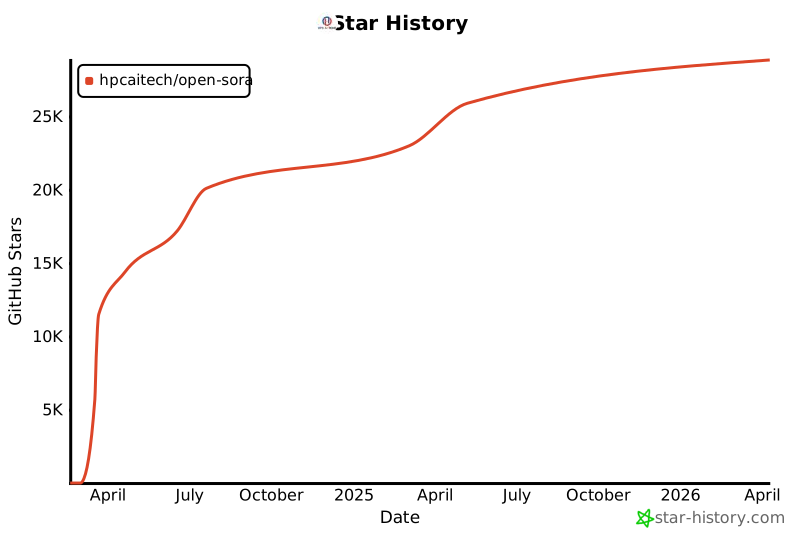](https://star-history.com/#hpcaitech/Open-Sora& Date)


